
Every stakeholder gets their own screen
Guests, floor staff, the kitchen, store managers, HQ — one system, five ways to use it. Explore it role by role.
- Customer · QR Ordering
- Front of House · POS
- Kitchen · Ticket Routing
- Takeaway · Pickup & Verification
- Store · Inventory & Reports
- Brand · Multi-Store HQ
- AI · Onboarding & Insights
Customer · QR Ordering
A native WeChat Mini Program experience plus an instant, no-install H5 menu. Put two QR codes on the table and guests can scan either one.
Menu in an instant
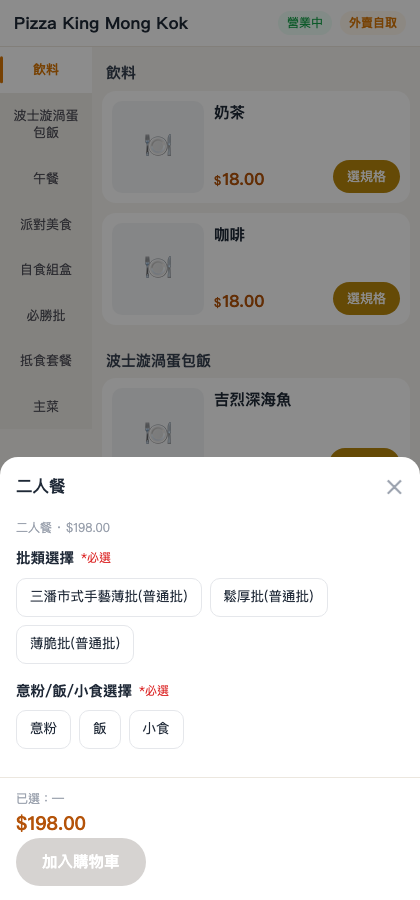
No app to download — category sidebar, bestseller tags, and items outside their serving window auto-grey out, so guests can't order what isn't being served.
Your wording, your rules
Hot or iced, sweetness, ice level, noodle base, extra portions, hold-the-prep — prep options render exactly as you configure them, so "no milk, less sweet" comes through just as the guest said it.
Combo logic
Multi-tier combos, cross-category pairings, drink upgrades with pay-the-difference — option groups carry selection caps, so the cashier never has to step in.
Order, timed right
The moment an order lands, the cashier master ticket and the kitchen route tickets print together — tea charge and service charge are added automatically per store settings.
Front of House · POS
An Android-native POS for tablets: install it on a tablet or a touchscreen cash terminal and go — same account, same data.
Order and settle, one screen
Table status, cover count, ordering, editing, voids, partial voids, and settling the bill — all on one screen; scan a table QR with the scanner gun to pull up an order.
Voided-order recycle bin
Accidentally void something? No panic — the recycle bin restores it, and void reasons are logged so reconciliation has a source of truth.
Clear and reset tables
One-tap table clear after checkout instantly frees the table; in a rush, see at a glance which tables still need clearing.
Six payment channels
WeChat Pay, QFPay, Octopus, FPS (Fast Payment System), credit card, and cash (manually entered at the counter) — channel mix flows into your reports.
Kitchen · Ticket Routing
Direct cloud-printing integration with a live-scrolling KDS display; tickets route by dish-to-printer binding, so nothing goes to the wrong printer even at peak.
Bind dishes to printers
A single dish can bind to multiple zone or label printers, locking the destination the moment it's ordered; combo sub-items route with their parent dish.
Live KDS display
Two columns — In Progress and Ready — scroll in real time and update the instant food is plated; no calling orders, no passing paper.
Big pickup numbers
The label printer stamps bold pickup numbers to stick on containers — matching a pickup is faster than making eye contact.
Traceable reprinting
Reprints, voids, and re-prints are all logged, so kitchen and front of house can reconcile without relying on anyone's memory.
Takeaway · Pickup & Verification
Self-pickup takeaway with no commission: independent pickup pricing, auto number assignment, and scan-to-hand-off.
Independent takeaway pricing
Set a separate pickup price for takeaway; when it exceeds the dine-in price, a strikethrough comparison shows automatically so guests see it instantly.
Auto pickup numbers
A pickup number is assigned the moment an order is placed, and an estimated pickup time is written into the order; guests watch "Preparing / Ready for pickup" live.
Scan to hand off
The guest's waiting page shows a verification code; staff scan it once to complete the hand-off — no calling names one by one.
In-store big screen
The in-store TV shows pickup progress plus promo content and the takeaway QR — open it directly in the TV's browser, no login needed.
Store · Inventory & Reports
Know how much you sold today — and which dish to 86 — before you even close up.
Daily inventory
Preset daily stock auto-replenishes; sold-out items auto-reject orders instead of accepting a half-order; voided orders auto-return stock.
Low-stock alerts
Drop below the low-stock threshold and a yellow highlight warns you, so you decide on the spot whether to restock or 86 it.
Today's specials
A daily special auto-reverts to the regular price the next day — no one has to remember to "change it back tomorrow."
Business reports
Revenue trend, daypart distribution, bestseller TOP list, payment-channel mix, and a staffed-vs-self-serve channel comparison.
Brand · Multi-Store HQ
Chain brands get their own HQ console — plus a dedicated subdomain entry point.
HQ overview
Today's and this month's GMV, live operating metrics across your stores, and in-progress order volume — all on one page.
One click into any store
Jump straight from the HQ console into any store's back office for a walk-through — no juggling multiple passwords.
Your own Mini Program
A brand can bind its own WeChat Mini Program AppID, so guests are entering your Mini Program.
Per-store billing
Commissions are itemized per store and can be consolidated into one invoice; dedicated rates and free quotas are configured per brand.
AI · Onboarding & Insights
The two hardest parts of going live — feeding your menu into the system and reading the numbers every day — AI handles both for you.
AI menu import
Upload a menu photo, Excel, or Word file and it's recognized into a structured dish list; HK-style rules generate automatically: drink hot/iced expansion and the no-ice / less-sweet / no-milk prep options.
AI business insights
Feed today's live data plus yesterday and the last 7 days into the model, and get an interpretation right on the POS sales page: which daypart is weak, which dish to push.
Not sure yet that it's practical? Scan a QR and try it yourself
The demo store has every feature unlocked — run the full flow, from ordering to pickup, in two minutes.
Try it for free →